



Have you ever come across a spy app that can show you the screen of the target Android phone as well as the activities that are currently taking place on it?
We have an app that can remotely provide a live view of your teen’s phone screen, which may sound a little far-fetched. That’s correct. And that’s not all; the app has many other exciting and useful features.
The app is called pcTattletale.You must create an account on the app, install it on the target Android phone, grant various permissions, and then you will be able to monitor the target person.
Creating a pcTattletale account
- Begin by visiting the official website of pcTattletale and clicking on the Download option, which is visible at the top.
- This will take you to the account creation page, where you must enter your information, such as your email address and password, and then click CREATE FREE ACCOUNT.
- By clicking on ADD A DEVICE, you can add the device that needs to be monitored.
- Select the type of device owned by the target user. It’s an Android phone in our case. Tap on NEXT to select it.
- You must decide how you want the app to be installed on your target device. We chose the Install Without Computer option, but you can select another if you prefer.
- You will receive a special download link from pcTattletale that you will use to install the app on your teen’s phone.
Installing pcTattletale on the Target Phone
Once you have their phone, here are the steps you must take to install pcTattletale on it.
Open any browser and look for the URL that pcTattletale generated specifically for you.
Once the page has fully loaded, the app will begin to download automatically. You may receive a warning that installing pcTattletale is dangerous, but ignore it and click OK.

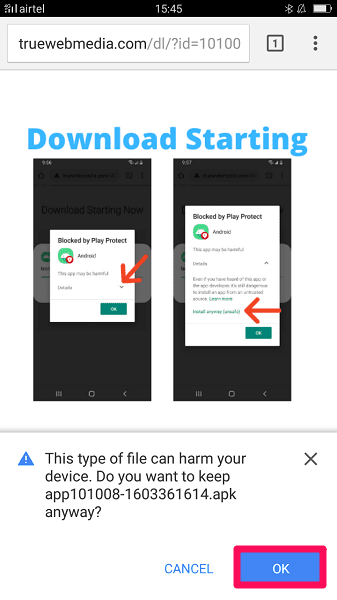
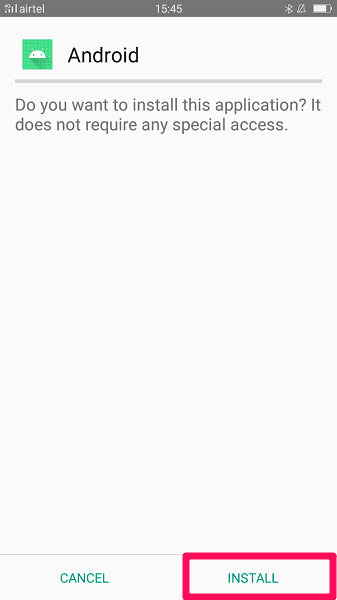
After the app has been downloaded, it is time to INSTALL it.
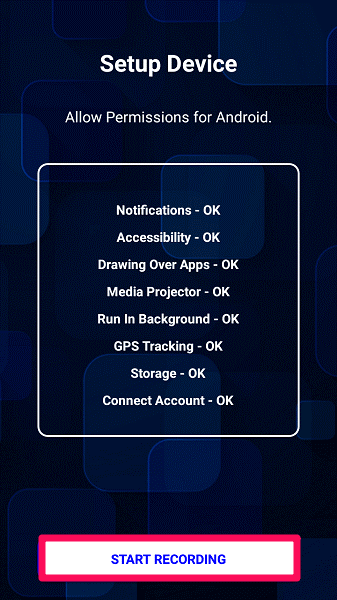
Certain permissions must be granted for monitoring to be complete and successful. These permissions include the ability to use the mobile network, record the screen, disregard battery optimization, and so on.
To begin using pcTattletal on the desired Android phone, click START RECORDING.
Return to your device, and on the dashboard, you will see the device that you just configured. Simply click on it to begin tracking it.
This app has three plans: FAMILY, FAMILY PLUS, and BUSINESS.
FAMILY plan ($99) – Monitoring for three devices with a seven-day storage capacity; adding a new device costs an additional $33.
FAMILY PLUS plan ($147) – Monitoring of three devices with a 30-day storage capacity. Pay an additional $49.50 for the addition of a second device.
BUSINESS plan ($297) – Finally, the BUSINESS plan provides monitoring for three devices, a 365-day storage capacity, and an extra $99 for adding device.