


The battery life of your iPhone should ideally last the entire day on a single charge. That doesn’t always work, though. To determine which apps are battery hogs, you can view them according to usage.
You may control the apps you view based on usage to extend the life of your iPhone’s battery. We’ll thus demonstrate in this article how to identify which apps, whether running in the background or on screen, are consuming the most battery life. We’ll walk you through some actions you can take to lower app battery consumption once you have that knowledge.

How to View Apps by Battery Usage
It’s simple to view apps based on battery usage; all you need is know where to look. Take these actions to achieve that.
- Launch the iPhone’s Settings app.
- From the menu, choose Battery by swiping down the screen.
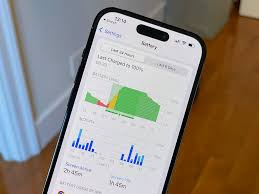
- To find out which applications utilize the most battery life, scroll down to the Battery Usage By App section.
- To see how long each program has been running in the background, on the screen, or both, tap the Show Activity option. Minutes will be shown for battery usage.
- To view the uptime of an app, you can also tap on it to get information. To check the running time of the Apple Music app, for example, I chose it in the screenshot below. It has been operating for almost two hours in the background and for eight minutes on screen.
How Can I Reduce the Battery Power Used by Apps?
You can calm them down now that you know which apps take the most battery life and run the longest. The apps that are highest on the list are the ones that drain the battery the most. The Home and Lock Screens are the worst offenders in my case. That indicates that I use my phone a lot, and I’m not sure what I can do about it. I have to use my phone and check. I may also turn on the display and enable the Always On option.
By turning on Low Power Mode, which turns off your app’s background activities and reduces screen brightness, you can further extend the life of your iPhone’s battery. To activate it, swipe down to reveal Control Center, then press the Low Power Mode (battery icon) button.
For the apps that use the most power, you can disable Background App Refresh if you don’t want to be restricted by Low Power Mode. Toggle off the apps you don’t want running in the background by navigating to Settings > General > Background App Refresh. Specifically, stop using the programs you discovered are using the most background resources.
Increasing the Life of Your iPhone battery
You can extend the duration of a single charge for your iPhone by being aware of the apps that drain the battery the most. You can take the necessary action to lower their battery usage once you have that knowledge.
To learn more about which apps are battery hogs, take the actions listed above. For certain programs, you can disable background use or switch to Low Power Mode as necessary.