

Many teams in different industries today rely on a ton of physical equipment to do their jobs: from IT support to video production brands, field service and maintenance to construction teams, and event teams, to name a few. For decades, the only way to keep track of this equipment and gear was specialized, legacy software.
The problem? These traditional systems are too expensive. Most of them charge per user, meaning hundreds to thousands of dollars annually to manage your inventory. What’s more? They’re packed with ‘enterprise features’ you may never use, they take time to learn, and for each item you’re tracking, you’ll still need to enter the details manually.
For most smaller teams, it’s been an impossible choice between paying for bloated software they can barely afford and don’t fully need, wasting countless hours maintaining ‘free spreadsheets’ that cost you time, or simply not tracking equipment at all and dealing with the consequences of lost gear and duplicate purchases.
Recently, a new wave of AI-powered inventory systems has started to change this. In this guide, we’ll discuss how AI image recognition eliminates manual data entry and, especially when paired with QR code tracking, creates an agile equipment management system that actually fits how modern teams work.
Why traditional asset management fails modern teams
When you need to pay for each team member to use them, these traditional asset management systems get pricey very quickly, especially for teams with more members.
These platforms typically try to justify the high price tags with the number of features they have, but in reality, many modern teams don’t need most of them. What you’re left with is an overstuffed interface and unnecessary steps to find the features you actually need: an inventory list that’s easy on the eyes, a way to update specific item details conveniently, and quickly know where items are.
Then there’s the issue of manual entry. With many of these systems, you still need to create and fill in your inventory manually (descriptions, quantities, brand, etc). This becomes a bottleneck for team managers who’re already juggling different tasks.
Many legacy inventory systems also come with desktop-first designs and only work with specialized scanning devices, meaning extra costs and delayed setup.
The issue is that many legacy asset management systems were designed for static workflows of warehouses and just no longer work for smaller modern teams who move quickly. Enter…

The Smartphone + AI + QR Code Solution
Modern AI-powered inventory systems are a practical option for teams that need flexibility without high costs. Here’s how they work:
AI recognizes items and creates inventory entries
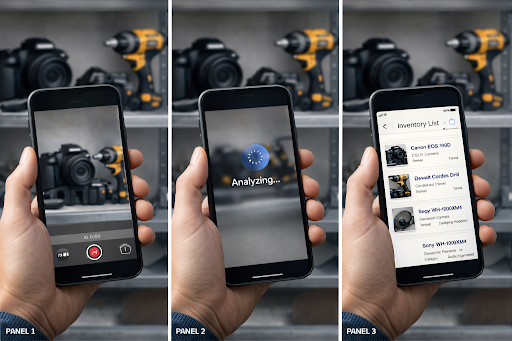
At the heart of modern smart inventory systems is AI image recognition. Some tools come with a built-in AI that is able to build a full inventory of equipment by analyzing photos or videos of items.
QR codes help with tracking
Some of these systems also feature QR-code-based tracking, where physical QR stickers are placed on the equipment and, when scanned, open up a URL that points to the digital record of the item hosted on the app itself.
Smartphones become scanners
Most smartphones today come with cameras that can scan QR codes. Since the equipment labels are QR-based, these smart inventory systems leverage this by allowing team members to scan items using their phones.
Combined, these core features allow modern teams to build and manage an inventory as quickly and cheaply as possible.
How budget-friendly AI-based systems speed up asset management
AI-powered inventory systems automate the bulk of the manual work when creating an inventory and pulling up information on your items. And many of them go for price tags that are a fraction of what you’ll pay for legacy systems. Here’s why AI-enabled inventory tools are the best approach to inventory for modern teams:
Team bundles save costs
First, some modern AI-enabled inventory systems come with bundle or ‘team’ pricing. So instead of paying per user, you pay a single bulk sum per month. Now the best part is, this bulk sum will typically be much lower than the amount you’d have paid for your whole team on a per-user model (typically in the tens of dollars).
Some newer tools, such as Scanlily, offer pricing models that are significantly more affordable than traditional per-user systems.
AI makes cataloging instant
The AI recognition capability that some of these tools offer is the biggest revolution in inventory creation. Instead of manually filling in the details of each item, you simply take a photo or video of the items you want to add to your inventory, and the AI will analyze the frames and create an entry for each item: brand and item names, descriptions, category, color, photos, etc.
No specialized devices needed… just their own phones
These AI-enabled inventory systems are even more affordable because, unlike legacy systems, teams don’t need to spend extra money on desktops or specialized scanners to use them. Since some of these tools come with QR-code-based tracking, any smartphone suddenly becomes a powerful scanner. Team members only need to use their phone cameras to scan the QR label and can immediately edit or update relevant fields for each item.
What’s more? AI-enabled inventory systems are mobile-first and are built as apps that live on team members’ phones… no need for expensive desktop systems. These make them extremely agile since the inventory is accessible to every team member wherever they are.
And a few platforms actually offer appless scanning, where anyone with a phone can have pre-configured access to item fields. This makes the most sense for contractors and temporary workers who don’t need long-term access like your permanent employees.
Finding items using natural language search
Legacy systems use keyword matching to show items in your inventory. The challenge with this is that if you have several items with similar names, you spend more time finding the exact one(s) you’re looking for.
Some modern phone-based inventory apps that feature AI allow you to ask questions and phrases to find particular items. If you typed ‘where’s the camera kit we used in San Diego last week?’, the AI actually understands your question semantically and in context, and then scans your item list, finds all the cameras, and then checks the location tags to find the one used in the location and within the time frame you specified.
With AI built in, these systems become intelligent assistants, and you find items much faster. Which brings us to the next point…
Items show up on actual maps
When you’re trying to find equipment or gear quickly, not knowing which warehouse or venue has the items you’re looking for can be very frustrating.
Some modern inventory apps also feature ‘GPS tagging’ where the exact GPS locations of your team members’ devices are captured whenever they scan the physical QR stickers placed on equipment, and these are shown on the map software the scanning phone uses. 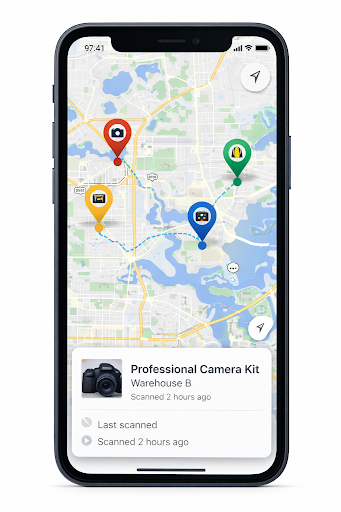

This location data is saved automatically and added to the main inventory you manage. That way, you can quickly find equipment based on the last saved coordinates or see a location trail that shows you how your items moved and where they were used.
Some of these apps also come with real-time GPS alerts that notify you whenever equipment is scanned in a new location, meaning you always know exactly where to find gear when you need it.
Visual organization means instant recall
Traditional inventory systems present equipment as text-based lists, and you’re scanning through rows of serial numbers, model names, and typed descriptions that all blur together to find a specific item. You are also reading through entries, cross-referencing codes, and hoping the person who entered the data described it accurately.
This text-first approach works against how human brains actually process information. We recognize images far faster than we decode written descriptions.
Some of these AI-powered systems flip this entirely. Every item in your inventory includes photos automatically extracted during the cataloging process, creating a visual catalog that works like your phone’s photo library. Scroll through the equipment and instantly spot the camera with the scratched body or the projector with the blue case.
Rounding up
Modern teams run workflows that legacy systems just can’t keep up with, and when you consider how expensive they are, they’re increasingly difficult to justify for fast-moving teams. Modern inventory tools that come with built-in AI recognition make adding items incredibly fast and simple.
The AI system analyzes images and videos of equipment and creates a separate entry for each item in minutes… the age of manual entry is now history! Better yet, these tools organize your inventory visually, so managers can find what they need through natural language searches and images instead of scrolling through text lists.
Finally, when combined with QR-based tracking in tools like Scanlily, AI-powered inventory becomes a more affordable, convenient, and faster way for modern teams to build and maintain organized equipment records.