



The era we currently live in and the level we have reached technologically has warranted the need to make things much less complex. Like Apple did with Siri, the Google Assistant is Google’s way of making smartphone usage and human interaction easier. And further following Siri’s footsteps, Google have made some changes to its virtual assistant.
For as long as I can recall, all digital assistants I have come across are accompanied by a default female voice response to all commands and requests (I really don’t know why though. Probably because the task of “assisting” have been stereotyped to be a female thing).
Not quite long ago, Google introduced a new voice option (Male Voice) to its native virtual voice assistant application, the Google Assistant. With this, it is very apparent that Google is trying to bring a whole new level of experience to the digital assistance world and give rivaling assistants a fierce competition as regards ranking.
To access the new Google Assistant’s male voice feature, follow the steps listed below;
- First off, launch the Google Assistant application on your smartphone, tablets or any other devices
- Click the menu button (that is the three dots icon at the top left corner of the app)
- On the menu options, tap on Settings
- In the settings menu, click on “Select Preferences“
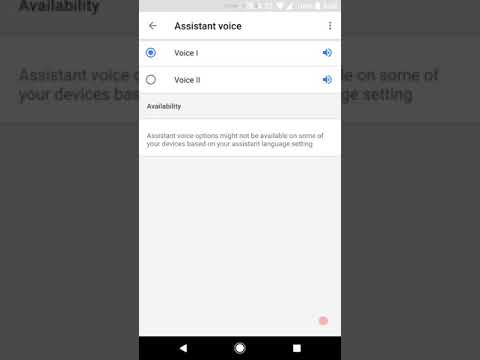
- Next, click on “Select Assistant Voice“
- You will be presented with two options “Voice I” and “Voice II”.
- According to Google, the Voice I is the code name for the Female Voice, which is default voice. Voice II on the other hand is the Male Voice.
- Click on “Voice II” to activate the Male Voice.
And that’s it. As simple as it comes. Doing the above correctly on the App will henceforward have Google Assistant reply your commands with a masculine voice.
You can hear the snippet of the Google Assistant’s Male Voice in the video below
Video Source: AndroidPolice