



Gmail is a well-known service tht is used by millions of people worldwide and is constantly being improved. Its many features, such as archives, labels, filters, search, and many more, make it easy for users to manage their email accounts. However, one additional great feature is the ability to retrieve emails that you may have inadvertently deleted. If you lose track of important emails, here’s how to recover deleted emails on Gmail.

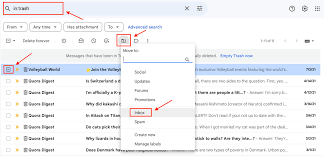
Method 1: Use Gmail’s Trash to Retrieve Deleted Emails
Deleted emails are kept in Gmail’s Trash and can be recovered if you haven’t already removed them from the folder. This is useful if you have looked through all of your labels and searched for the missing email. This is how to retrieve erased emails from the trash folder in Gmail.
On a PC
- Launch a browser and navigate to the Gmail website.
- To view all of the options, select the More tab from the sidebar on the left.
- Click Trash when this section expands to check if the item you’re looking for is still there.
- If you found the email(s) you accidentally deleted, select them by checking the boxes on the left-hand side.
- Finally, click on the Move to button and select Inbox.
On Phone
- Launch the Gmail app and tap on the hamburger icon.
- Scroll down on the left sidebar and select Bin.
- Select the emails you want to restore. You can do that by long-pressing on a desired email and selecting and tap on the 3-dots icon at the top right.
- Finally, tap on Move to and choose Primary.
Method 2: Using the Gmail Recovery Tool
Try utilizing the Gmail Recovery Tool if you are unable to locate the deleted email or emails in the trash. As long as the deleted email was not erased more than 30 days ago, you can recover deleted emails with the use of this official Google tool.
- Access your Google account by visiting the Gmail Message Recovery Tool page and logging in.
- After selecting “Continue,” your inbox should immediately have your emails again.
- Navigate to your inbox and search for the desired email using the search bar.
Still, a final option would be to get in touch with Google. Assistance from a Google customer support executive is included if you are a Google One subscriber. They might be able to restore the email if it was really essential.