Sleep is a feature on one’s computer that allows you to save your computer state in a very low power mode. Sleep can be a continent when you’re not going to use your computer for a while, and you want to save everything that’s open, but it can also cause problems.
Windows 10 offers a few different ways to shut down your PC. “Sleep” is the most common choice, which is why you can decide how long it takes to get your PC to sleep. One can customize this period of time to effectively suit your purpose.
Use these steps to choose how long your windows 10 waits before sleeping:
Tap the windows key in the bottom left corner of your screen, and then click the Settings button.
Press the Personalization button in the Settings window.
Click the Lock screen on the left menu. Afterwards, scroll down to the right and click Screen Timeout Settings.
Start changing the time settings to a higher level on the next screen. If you’d like to disable them, pick never from the dropdown.
Alternative Method
Press the windows key + x to open the menu on the left and then click the control panel.
Search the power options in the search box. After which press on the power options from the results you have obtained.
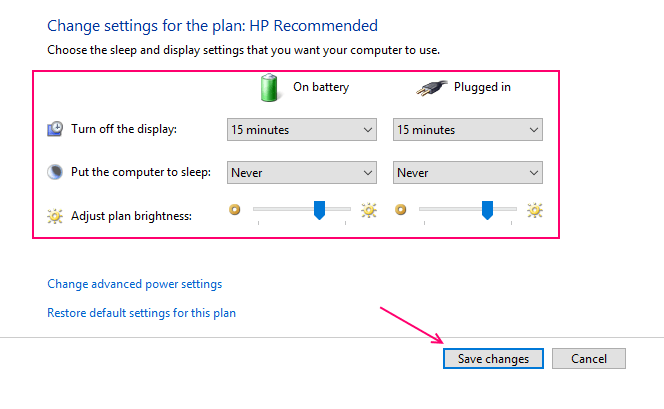
Once you meet the Power Option window, just tap Change Plan Settings of the current plan that is selected.
Select the timing from the dropdown and change it to your desired time interval. You can also never select this feature as a setting to completely disable it.
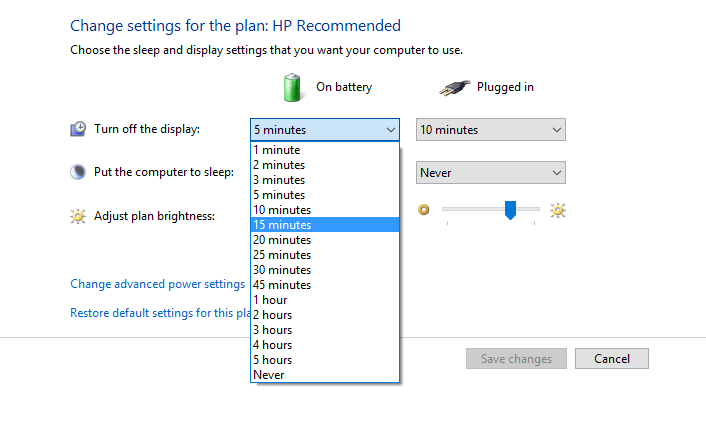
Do similar settings for both the battery and the plugged in option.
In the same way, change your computer to sleep settings as per your wish. Finally, click the Save Change button.