



Snapchat is set up in such a way that photos and videos disappear after a short period. Every time you take a screenshot of a snap, your friend receives a notification. If you don’t know that person well, it can be a little creepy. It is not rocket science to capture a screenshot on Snapchat without sending the notification.
Here’s a quick guide on how to screenshot on Snapchat without notifying the person.
Using a different smartphone to record
The simplest Snapchat screenshot hack is to use another smartphone to record a video or take a picture of a Snapchat image.
Using the in-built screen recorder
Android
- To access the notification panel, simply swipe down on the screen.
- Swipe once more to access the Quick Settings panel.
- Now, on the panel, swipe right until you see the Screen Record icon.
- To get started, tap on it.
iPhone
- Navigate to Settings and select the Control Centre option.
- Tap it and then choose Customize Controls.
- After that, simply add the screen recorder option and you’re done.
You can now take a screenshot of the Snapchat story while it is being recorded.
Activating airplane mode
- Open Snapchat to ensure that all of the snaps have been loaded (but do not view them!).
- Turn off Wi-Fi, mobile data, and even Bluetooth now. After that, activate the airplane mode.

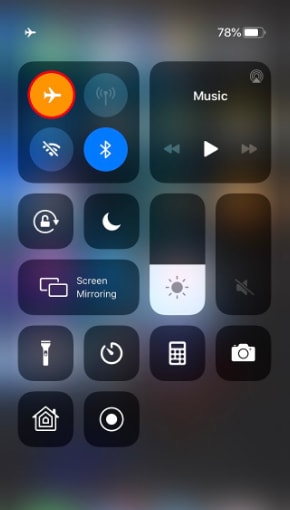
- Once you’ve confirmed that your device isn’t connected to the internet, launch Snapchat.
- Simply open the snap you want to screenshot, take a screenshot, and you’re done.
- Turn on your internet connection after 30 seconds or a minute, and no one will know what you just did.
Making Use of Google Assistant on Android Devices
- Open Snapchat and select the snaps that you want to save to your gallery.
- Call out to Google Assistant by long-pressing the home button or saying “OK, Google.”
- Request that the digital assistant take a screenshot verbally or by typing, and the work is completed without anyone knowing.
Using third-party apps
There are some to save a Snapchat snap without anyone knowing. They are available for download from the Google Play Store.
Snap saver
- You simply need to download and launch the app.
- You must choose from the available options (Screenshot, Screen Recording, Burst Screenshot, and Integrated)
- Go over to Snapchat.
- Open the snap that you want to save.
- The Snap Saver camera icon will appear on your screen; tap on it.
- A screenshot will be taken without the person’s notification.
Sneakaboo
- You must download it and sign in with your Snapchat credentials.
- All the new Snapchat Stories will appear on the app
- You simply need to take a screenshot of them while they are playing.
This will not notify the other user of the screenshot as your work progresses.
Making use of a screen recorder app
Install any of the screen recorder apps for Android available on the Google Play Store.
For more information, check our list of the best screen recorder apps and download the ones you like.
Using Android’s Mirror feature

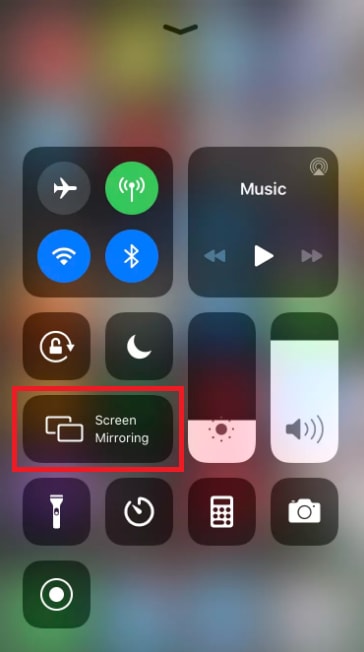
- You must use the screen mirroring feature (which can be found in your smartphone’s Settings).
- You will need to open Snapchat and record the Snapchat video or photo with another device.
- After a few edits, you’ll have access to someone else’s Snapchat Story, and they won’t even know.
These are some of the simplest methods for how to Screenshot on Snapchat without them knowing. I hope that after experimenting with the aforementioned tips and tricks, you were able to save or record Snapchat Stories without the knowledge of others.