
It is helpful to adjust an iPhone’s energy-saving mode to immediately activate even if the battery life is less than 20%. The iPhone Shortcuts feature lets you do many things, including managing your iPhone’s energy use. At the moment, Apple has opted to initiate the iPhone’s power-saving mode only when the latter’s battery life reaches 20%. Recall, this power-saving mode helps decrease the iPhone’s power consumption by turning off 4G or 5G, deactivating email processing and background app refresh, and so on.
Only 20% is a small percentage, yet many would like to preserve much more battery life. It is possible to configure automation at various portions using the iOS application Shortcuts, and this guide is there to show you how to achieve that
To achieve this, go to the Shortcuts, then automation which is found in the middle of the screen. After choosing automation, you will be redirected to the configuration screen, where you will have to hit the “+” option on the upper right or the button(Create personal automation) found on the center of the screen
Choose the battery level option, but don confuse and select the Power saving Mode, which is a very different function and won’t help us achieve the desired results here.
From here, it will now be possible to select the degree of remaining autonomy at which you will want the power-saving mode to be put on. Select less than 50% from the drop-down menu (this depends on your choice from the three options presented to you). When you choose the next option in the top right corner of the screen, the action selection page should appear. Choose + Add action as seen from the Drop-down menu

To save time and avoid having to scroll through the options:
- Go to settings
- On the search bar, search for saving
- Choose and select Set energy-saving mode on the option that appears
- Tap on Enable power saving mode from the page that appears
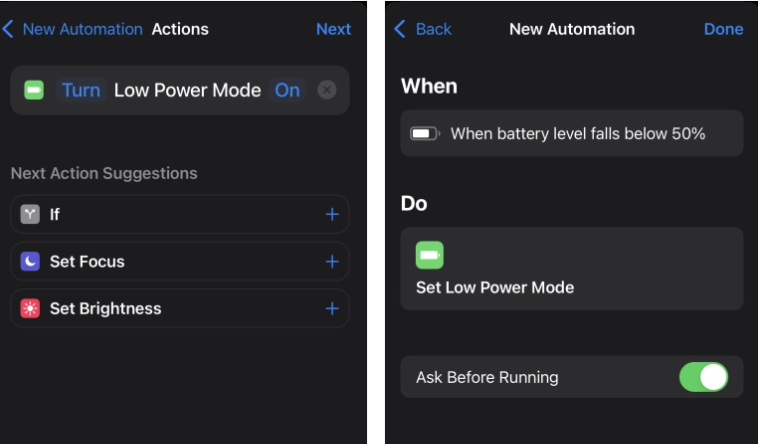
At the upper right of your screen, tap “Next.” You’ve arrived at the confirmation page for automation. Disable “Ask before running” and confirm your selection. As a result, without your permission, your iPhone will take action on its own. All you have to do now is hit “Ok” in the top right corner of your screen to finish the automation.

