
back to top
  • Home
Search
LogoTECHMORANAFRICA\'S TOP STARTUP, TECH NEWS & REVIEWS
Sign in
Welcome! Log into your account
Forgot your password? Get help
Privacy Policy
Password recovery
Recover your password
A password will be e-mailed to you.
Sunday, July 26, 2026
Sign in / Join
Facebook
Instagram
X
Vimeo
Youtube
LogoTECHMORANAFRICA\'S TOP STARTUP, TECH NEWS & REVIEWS
  • Home
    • Editor Picks
    • Events
    • Brand Voice
    • Insider
  • Tech
  • Business
    • Insurance
    • Money
    • Motoring
  • Startups
  • Mobile
    • Apple
    • Android
    • Reviews
  • How To
    • Guides
    • Hacks & Facts
  • Women
    • Women In Tech
  • Editions
    • UK Edition
    • US Edition
    • India Edition
    • International Edition
    • MENA Edition
  • AI
    • Sustainability
    • Solar
    • cryptocurrencies
    • Cybersecurity
    • Crypto Games
  • Advertise
    • CEO Weekends
    • Obituaries
    • Partner Content
More
    Home How To How to Change Your Password for Your eCitizen Account
    • How To

    How to Change Your Password for Your eCitizen Account

    By
    Yvone Kendi
    -
    February 14, 2024
    0
    655
    Share
    Facebook
    X
    Pinterest
    WhatsApp

      The eCitizen Password, as previously stated, is crucial to the safety of a person’s eCitizen account in Kenya. People frequently misplace or even forget the password they used to access their eCitizen accounts. The good news is that changing your eCitizen Password online is incredibly easy to do and only requires a few simple steps.

      Requirements for Changing the Password for an eCitizen Account:

      Mobile Number Associated With the Account
      The cellphone number that was used to establish or register the eCitizen account must be possessed by the person wishing to change their password. This is significant because the phone number associated with the eCitizen account will allow you to get the eCitizen OTP (One Time Password), which may be used to update your eCitizen Password.

      Email Address Linked to eCitizen Account: Having an email address linked to your eCitizen account is a necessity for online password changes. This is crucial since your email address will also be used to get the eCitizen Password Reset token. Since the reset email could take some time, it is best to use your mobile number instead of your email address to obtain the OTP verification code.

      Change Your Password for Your eCitizen Account
      Using https://accounts.ecitizen.go.ke/en to access the eCitizen website is the first step in updating your eCitizen password online.

      To start the process of updating your eCitizen Password online, navigate to the top right menu on eCitizen and select “Sign in.”

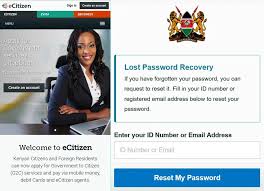
      Select the “Forgot Password” link beneath the password entry field on the right side of the eCitizen login screen.

      You can change your forgotten eCitizen password online by visiting the Forgot eCitizen Password page. Here, you can choose your account type (citizen, resident, diplomat, or foreigner; we chose resident, being a Kenyan), email address, or ID number (we chose ID number because it is faster). Click “Next” after making your selection.

      The OTP Verification code from eCitizen, which was sent to the phone number associated with your eCitizen account, must be entered in this stage. Click “Next” once the eCitizen OTP Verification Code has been input. A pop-up notification stating that a six-digit OTP has been delivered to your email address and mobile number will appear. Verify the SMS number using the OTP code obtained from eCitizen. To find the same code, check your email address as well, so pick the one that suits you the most.

      Creating a new eCitizen Password for your online eCitizen account is the final step. It is strongly advised that your new eCitizen account be protected from threats and misuse.

      Passwords should adhere to the following rules:

      consists of at least 8 characters
      At least one capital letter and one lowercase letter are included.
      has a minimum of one digit
      At least one special character is included, such as!@1#$%^&*()_+{}[]:;?/|\

      Click “Next” once your new eCitizen Password has been set up. You can now proceed to connect to your eCitizen account using both your ID number and the newly selected and established eCitizen Password after receiving a signal indicating that your eCitizen Password has been successfully changed.

      Following the six steps on How To Change eCitizen Password Online in Kenya above, you can change your eCitizen password after you have any of these two essential items with you. After that, you can connect into your eCitizen account and make requests for the several government services that are available on the platform by using your new eCitizen Account Password.

      1. ↩︎
      • TAGS
      • eCitizen account recovery
      Share
      Facebook
      X
      Pinterest
      WhatsApp
        Previous articleHow to speed up your laptop 10x
        Next articleHow to Download a Tax Compliance Certificate (TCC) Step-by-Step
        Yvone Kendi
        Yvone Kendi
        Writer by heart. Lover of life and technology. Helping you with simple life hacks using technology. Contact me at info@techmoran.com

        LEAVE A REPLY

        Log in to leave a comment

        Editor Picks

        WayaWaya Appoints Former Chase Bank Executive Raj Singh to Board

        July 25, 2026

        Airtel Money Kenya’s Anne Kinuthia-Otieno to Step Down After Driving Five Years of Growth

        July 25, 2026

        M-KOPA Hits 10 Million Customers on Smartphone Financing Boom

        July 23, 2026

        Popular Posts

        IT Guru Attempts To Crack Secret Safaricom Scratch Card Code

        October 10, 2013

        How To Make Your Phone Busy When Someone Calls

        September 23, 2021

        Ampion among winners of the 2015 Innovation Ecosystem Awards

        January 31, 2015

        Popular Category

        • Tech9990
        • Startups6955
        • Business2625
        • Mobile1306
        • Guides1159
        • How To1059

        ABOUT US

        TechMoran.com, a Moran Media company is a top, independent, media and events company connecting pan-African startup founders to the global tech ecosystem, markets and investors. With reporters in Dubai, Lagos, Nairobi and Johannesburg, we provide you with the latest accurate and verifiable breaking news, views and reviews and latest indepth business insights on world's burgeoning tech, business, sustainability and finance ecosystem.

        Great partnerships begin here. Say hello: sales@techmoran.com

        Business & Partnerships: sales@techmoran.com

        Tips, Events & Editorial: editor@techmoran.com

        Facebook
        X
        Vimeo
        VKontakte
        Youtube

        © TechMoran 2026. With Love Since 2012.

        • Home
        • Tech
        • Business
        • Startups
        • Mobile
        • How To
        • Women
        • Editions
        • AI
        • Advertise