
back to top
Sign in Join
Sign in
Welcome!Log into your account
Forgot your password?
Create an account
Privacy Policy
Sign up
Welcome!Register for an account
A password will be e-mailed to you.
Privacy Policy
Password recovery
Recover your password
Search
LogoTECHMORANAFRICA\'S TOP STARTUP, TECH NEWS & REVIEWS
Sign in
Welcome! Log into your account
Forgot your password? Get help
Create an account
Privacy Policy
Create an account
Welcome! Register for an account
A password will be e-mailed to you.
Privacy Policy
Password recovery
Recover your password
A password will be e-mailed to you.
Thursday, March 12, 2026
Sign in / Join
Facebook
Instagram
Twitter
Vimeo
Youtube
LogoTECHMORANAFRICA\'S TOP STARTUP, TECH NEWS & REVIEWS
spot_imgspot_imgspot_imgspot_img
  • Tech
  • Business
  • Startups
  • Mobile
  • Women
  • Guides
  • Editions
    • US Edition
    • India Edition
    • MENA Edition
    • Europe Edition
    • International Edition
  • Advertise
  • Conference
  • TechNight
More
    Home How To How to Change Your Password for Your eCitizen Account
    • How To

    How to Change Your Password for Your eCitizen Account

    By
    Yvone Kendi
    -
    February 14, 2024
    0
    532
    Share
    Facebook
    Twitter
    Pinterest
    WhatsApp
      Share this

      The eCitizen Password, as previously stated, is crucial to the safety of a person’s eCitizen account in Kenya. People frequently misplace or even forget the password they used to access their eCitizen accounts. The good news is that changing your eCitizen Password online is incredibly easy to do and only requires a few simple steps.

      Requirements for Changing the Password for an eCitizen Account:

      Mobile Number Associated With the Account
      The cellphone number that was used to establish or register the eCitizen account must be possessed by the person wishing to change their password. This is significant because the phone number associated with the eCitizen account will allow you to get the eCitizen OTP (One Time Password), which may be used to update your eCitizen Password.

      Email Address Linked to eCitizen Account: Having an email address linked to your eCitizen account is a necessity for online password changes. This is crucial since your email address will also be used to get the eCitizen Password Reset token. Since the reset email could take some time, it is best to use your mobile number instead of your email address to obtain the OTP verification code.

      Trending
      Nigeria’s Insidify.com Wants to be the ‘Google’ for Jobs in Africa & Other Emerging Markets

      Change Your Password for Your eCitizen Account
      Using https://accounts.ecitizen.go.ke/en to access the eCitizen website is the first step in updating your eCitizen password online.

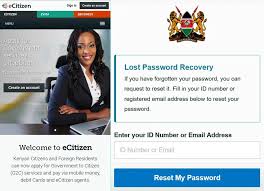
      To start the process of updating your eCitizen Password online, navigate to the top right menu on eCitizen and select “Sign in.”

      Select the “Forgot Password” link beneath the password entry field on the right side of the eCitizen login screen.

      You can change your forgotten eCitizen password online by visiting the Forgot eCitizen Password page. Here, you can choose your account type (citizen, resident, diplomat, or foreigner; we chose resident, being a Kenyan), email address, or ID number (we chose ID number because it is faster). Click “Next” after making your selection.

      The OTP Verification code from eCitizen, which was sent to the phone number associated with your eCitizen account, must be entered in this stage. Click “Next” once the eCitizen OTP Verification Code has been input. A pop-up notification stating that a six-digit OTP has been delivered to your email address and mobile number will appear. Verify the SMS number using the OTP code obtained from eCitizen. To find the same code, check your email address as well, so pick the one that suits you the most.

      Creating a new eCitizen Password for your online eCitizen account is the final step. It is strongly advised that your new eCitizen account be protected from threats and misuse.

      Passwords should adhere to the following rules:

      consists of at least 8 characters
      At least one capital letter and one lowercase letter are included.
      has a minimum of one digit
      At least one special character is included, such as!@1#$%^&*()_+{}[]:;?/|\

      Click “Next” once your new eCitizen Password has been set up. You can now proceed to connect to your eCitizen account using both your ID number and the newly selected and established eCitizen Password after receiving a signal indicating that your eCitizen Password has been successfully changed.

      Following the six steps on How To Change eCitizen Password Online in Kenya above, you can change your eCitizen password after you have any of these two essential items with you. After that, you can connect into your eCitizen account and make requests for the several government services that are available on the platform by using your new eCitizen Account Password.

      1. ↩︎
      Share this
      • TAGS
      • eCitizen account recovery
      Share
      Facebook
      Twitter
      Pinterest
      WhatsApp
        Previous articleHow to speed up your laptop 10x
        Next articleHow to Download a Tax Compliance Certificate (TCC) Step-by-Step
        Yvone Kendi
        Yvone Kendi
        Writer by heart. Lover of life and technology. Helping you with simple life hacks using technology. Contact me at info@techmoran.com

        LEAVE A REPLY

        Log in to leave a comment

        Editor Picks

        The Era of Hyper-Connectivity: How AI Is Turning the Smartphone Into the Brain of the Modern Home

        March 12, 2026

        Canal+ Unveils €100m Rescue Package for MultiChoice Following Subscriber Exodus

        March 12, 2026

        WhatsApp Unveils New Managed Accounts for Children Under 13

        March 12, 2026

        Popular Posts

        How To Make Your Phone Busy When Someone Calls

        September 23, 2021

        IT Guru Attempts To Crack Secret Safaricom Scratch Card Code

        October 10, 2013

        Ampion among winners of the 2015 Innovation Ecosystem Awards

        January 31, 2015

        Popular Category

        • Tech9855
        • Startups6786
        • Business2532
        • Mobile1290
        • Guides1150
        • How To1063

        ABOUT US

        TechMoran is Africa's top independent media for startup founders, tech geeks and investors . Based in Africa, with teams spread across the continent, we provide you with the latest accurate and verifiable breaking news, views and reviews and latest indepth business insights on Africa's burgeoning tech and finance ecosystem. N/B: We are not an online shop. Do not sell cars, engines, smartphones or any hardware or software.

        Contact us: sales@techmoran.com

        TechMoran

        Facebook
        Twitter
        Vimeo
        VKontakte
        Youtube

        © TechMoran 2026. With Love From Africa Since 2012.

        • Advertise
        • Motoring
        • Money
        • Women in Tech
        • Gadgets
        • Columnists
        • Obituaries
        • Hacks & Facts
        • Founders Friday
        • CEO Weekends
        • TechMoran TV+
        • Privacy Policy