
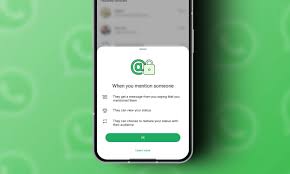
The mentions feature on WhatsApp, which functions similarly to tagging friends in Facebook and Instagram posts, has been under development for some time. The feature was expected to be released concurrently with usernames. However, the status mentions feature arrived sooner than anticipated in the most recent WhatsApp beta.
The most recent Android WhatsApp Beta version, 2.24.20.3, according to WABetaInfo, allows you to name contacts in status updates. It functions differently from other platforms, though. Only the person you mention will receive a notification and a chat message. Who was tagged will remain unknown to other contacts who check your status. in order to discreetly bring up your favorite someone without alerting others.
In WhatsApp, how do you mention someone?
How you can mention someone in WhatsApp when the feature gets on your device.
- Navigate to the Updates page, hit the camera icon, and either snap a picture or choose one from the gallery.
- Next, press the @ symbol within the text field.
- Find and pick the person you wish to mention in your search.
- To verify the choice and share your status, tap the checkmark.
Now, only you will be able to see whom you have mentioned in a status. Tap the three dots in the upper right corner of WhatsApp and choose View mentions to see who you have mentioned on your status.
As of this writing, WhatsApp only lets you mention a maximum of five individuals.
When someone mentions you on their status, what happens?
A notification stating that someone privately referenced you in their WhatsApp status will be sent to you. You will receive a private message in the conversation thread with this individual informing you of the same. A “Mentioned Privately” banner should appear at the top of the status view, directly below the name of the sharer.
Only individuals named will be able to see this status. Nor will they be able to see the additional contacts that were indicated. You have the option to alter and reshare someone else’s WhatsApp status to a different audience when they mention you in private. WhatsApp will not divulge to your audience the name, phone number, or any other information of the person who mentioned you when you reshare.
It’s important to keep in mind that you could be mentioned in a status update by any WhatsApp user. Thus, you can be discreetly mentioned by people who are not on your contacts list. There isn’t a toggle in the app right now to turn this off. To prevent someone from mentioning you on WhatsApp, you can either block them or archive/mute their conversation.